
Kafka Internals: How Topics, Partitions, and Replicas Actually Work
When you start building real-time streaming systems, you’ll inevitably hear “Kafka is the backbone of modern data architectures.” But what does that really mean under the hood?
Let’s break it down step by step, so you not only know what Kafka does, but also why it was designed this way.
First Things First: What Is Apache Kafka?
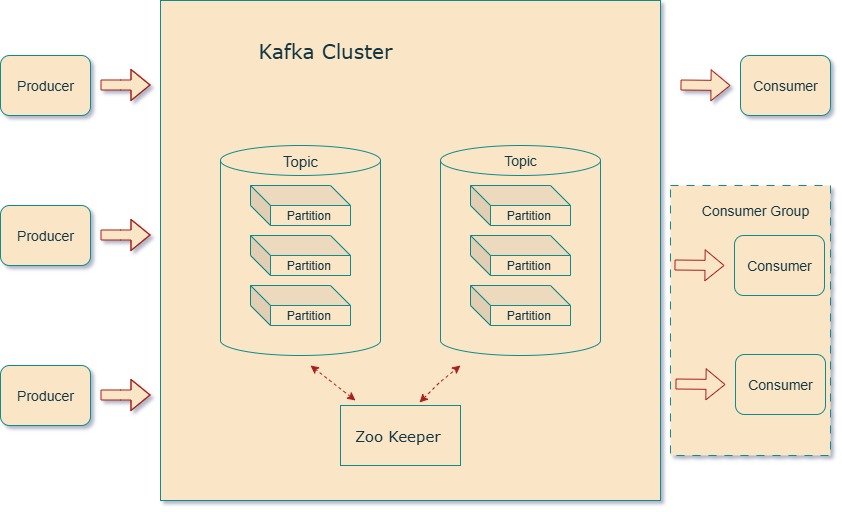
At its simplest, Kafka is a distributed message broker. It sits in the middle of your systems, making sure that:
- Messages are received from producers (apps sending data).
- Messages are stored reliably in log files.
- Messages are delivered to consumers (apps that need the data).
That’s it. Everything else — APIs, libraries, connectors — are tools built on top of this core broker capability.
But when people call Kafka a “horizontally scalable, fault-tolerant distributed streaming platform” — that’s where the fun starts.
Kafka Topics: The “Tables” of Event Data
In a database, you need a table to store records. In Kafka, you need a topic to store messages.
- A topic = logical grouping of related events.
- Example:
invoicestopic for all invoice events.
But a single file holding millions of messages isn’t practical. That’s where partitions come in.
Partitions: Kafka’s Secret to Scale
Each topic is split into partitions. Think of partitions as “buckets of messages.”
- Topic with 5 partitions → Kafka creates 5 directories on disk.
- Messages are evenly distributed across them.
This has two benefits:
- Scalability – Multiple brokers can handle different partitions.
- Parallelism – Consumers can read from different partitions at the same time.
Replication: Keeping Your Data Safe
Partitions alone aren’t enough. What if a broker crashes? Kafka solves this with replication.
- Each partition can have multiple replicas.
- One replica is the leader, others are followers.
- Producers and consumers always talk to the leader.
- Followers just copy the leader, staying in sync in case they need to take over.
Example:
- Topic = 5 partitions, Replication Factor = 3.
- Kafka creates 15 directories (5 leaders + 10 followers) spread across brokers.
This design ensures both scalability and fault tolerance.
Log Segments: How Kafka Stores Messages
Inside each partition directory, Kafka doesn’t just create one huge file. Instead, it splits data into segment files.
- Default segment size = 1 GB or 1 week (whichever comes first).
- Each message has a unique offset (like a line number).
- Offsets are unique only within a partition, not across the whole topic.
This is why consumers need three things to locate a message:
- Topic name
- Partition number
- Offset
Indexes: Fast Lookup by Offset or Time
Kafka maintains:
- Offset index → map offsets to file positions.
- Time index → map timestamps to offsets.
This lets consumers fetch data either “from offset X” or “from timestamp Y” quickly.
Kafka Clusters: Scaling Beyond a Single Broker
Running Kafka on a single machine is fine for dev, but in production you’ll have clusters with 3, 5, or even 100+ brokers.
Here’s what happens in a cluster:
- Zookeeper (or KRaft in newer versions) tracks active brokers.
- Each broker registers itself as an ephemeral node.
- If a broker dies, Zookeeper notices and removes it.
- Controller election – One broker is elected as the controller.
- It’s not a master; it’s just a broker with extra duties.
- It reassigns partitions when brokers join/leave.
This ensures the cluster remains consistent and fault-tolerant.
Partition Allocation: Balancing Leaders and Followers
When you create a topic with partitions + replication, Kafka has to decide where to put them across brokers.
The goals:
- Even distribution → balance workload across brokers.
- Fault tolerance → don’t place all replicas on the same machine/rack.
Example:
- 6 brokers, 10 partitions, replication factor = 3 → 30 replicas.
- Kafka spreads them using a round-robin approach, ensuring leaders/followers are placed across different brokers and racks.
Leaders, Followers, and the ISR List
Let’s zoom in:
- Leader partitions handle all reads/writes.
- Follower partitions copy data to stay ready as backups.
- To ensure reliability, Kafka maintains an In-Sync Replicas (ISR) list.
ISR contains all replicas that are caught up with the leader.
- If the leader crashes → one of the ISR members becomes the new leader.
- If a follower lags too much, it’s temporarily removed from ISR.
This mechanism ensures you don’t accidentally promote a stale replica as leader.
Committed vs. Uncommitted Messages
Kafka adds another safety layer:
- A message is committed only when written to all replicas in ISR.
- Producers can request acknowledgment only after commit.
- If the leader dies before commit, the producer will resend.
This guarantees durability without sacrificing speed.
Minimum In-Sync Replicas (min.insync.replicas)
One more config that matters for reliability:
- If you set
min.insync.replicas = 2with replication factor = 3 →
Kafka will only accept writes if at least 2 replicas are in sync. - If fewer replicas are available, writes fail with a “Not Enough Replicas” error.
This prevents situations where a single replica (the leader) becomes a silent single point of failure.
Wrapping It Up
- Kafka stores data in topics, which are split into partitions.
- Partitions are replicated for fault tolerance.
- Messages live in log segments with offsets and indexes.
- Brokers form a cluster, coordinated by Zookeeper/Controller.
- Kafka ensures reliability using ISR lists, committed messages, and min.insync.replicas.
As a developer, don’t just think of Kafka as a “black box.” It’s not just another queue. It’s a carefully engineered distributed log system that balances speed, scale, and safety.
Next time you design with Kafka, remember — under the hood, it’s just topics, partitions, replicas, and logs… but designed in a way that scales to trillions of events.