
From Producers to Real-Time Topologies
When you first step into the world of Apache Kafka, it feels like walking into a busy airport. Producers are like airplanes constantly landing with new passengers (data), Consumers are like buses waiting to pick up those passengers, and Kafka Streams is the control tower that orchestrates real-time decisions.
In this blog, I’ll walk you through Kafka’s journey — starting from basic Consumers, touching on scalability and offsets, and then moving into the Kafka Streams API, where the real magic of stream processing happens.
Starting Point: Producers and Consumers
Every Kafka application begins with a Producer. Producers generate and push records into Kafka topics. Kafka producer APIs internals is an another interesting topic worth of a separate post. Here I will try to give an high level views how it works.
When a Kafka producer sends a ProducerRecord to the Kafka broker, it doesn’t immediately push it over the network. Instead, the record first goes through a few essential steps:
- Serialization – Converting the key and value into bytes so they can travel over the network. Without this step, Kafka can’t transmit your data to a remote broker.
- Partitioning – Deciding which partition within the topic the record should land in.
- Buffering – Storing the record temporarily in the producer’s buffer before dispatch. This mechanism helps to achieve asynchronous send and network trip optimization. Background I/O thread can accumulate multiple messages and send as one message to the cluster.
Now, Kafka doesn’t magically know how to serialize your key and value objects. That’s why you must explicitly configure serializer classes. These tell Kafka how to convert your key/value into byte arrays.
For example, in our earlier setup, we used:
IntegerSerializerfor the keyStringSerializerfor the value
This ensures that both the key and value are properly serialized and ready for transmission to the broker.
But what about Consumers?
A Kafka Consumer subscribes to a topic and continuously polls for new messages. Think of it like a never-ending loop that grabs records, processes them, and moves on.
Consumer Challenges: Scalability & Fault Tolerance
Let’s be honest: writing a “hello world” consumer is easy. But when your system scales, things get tricky:
- Scalability → If producers are writing faster than your single consumer can process, you’ll fall behind.
- Fault Tolerance → What if your consumer crashes after processing a batch but before committing offsets? Boom, you’ve got duplicate processing.
- Consumers can form a group.
- Kafka automatically distributes topic partitions among consumers in that group.
- Example: Topic has 10 partitions, you run 2 consumers → each gets 5 partitions.
- No duplication, no stepping on each other’s toes.
Offsets & Commits
Offsets are bookmarks inside a partition ,In Kafka, each message in a partition has a unique, monotonically increasing offset number
- Current Offset → Where the consumer is currently reading. The current offset represents the next message the consumer will read from a given partition. It moves forward automatically as the consumer fetches records from the broker.
- Committed Offset → The last processed (and acknowledged) record. The committed offset is the offset that has been successfully processed and saved (committed) to Kafka. This is what allows the consumer to resume from the correct position in case it restarts or crashes. Kafka maintains all committed offsets in a dedicated internal topic named
__consumer_offsets. Each consumer group maintains its own committed offsets per partition.
But here’s the catch:
- If you auto-commit too eagerly → you risk losing unprocessed data.
- If you commit too late → you risk duplicates.
This is where transactions or exactly-once semantics come in ..
How EOS Works Conceptually
When a consumer reads messages and produces results to another Kafka topic (or database):
- Start a transaction.
- Consume records from a topic.
- Process them.
- Produce results to another topic (or sink).
- Send offsets as part of the transaction (using
sendOffsetsToTransaction()). - Commit the transaction.
Why Kafka Streams?
Here’s the truth: Consumer APIs are great for simple cases (like basic validation pipelines). But when you need windowing, joins, aggregations, or fault tolerance, writing all that logic yourself is painful and error-prone.
Kafka Streams API solves this.
- Built on top of Producers & Consumers.
- Provides higher-level abstractions for stream processing.
- Handles parallelism, fault tolerance, state management — so you don’t reinvent the wheel.
Think of it as moving from assembly language (Consumer APIs) to a modern programming language (Kafka Streams DSL).
Let’s take a real-world example:
ATS (Applicant Tracking System) can absolutely be built using Kafka Streams. In fact, Kafka Streams fits naturally into an ATS because hiring workflows generate real-time event data that needs to be processed, validated, enriched, and routed to different services.
Below DAG
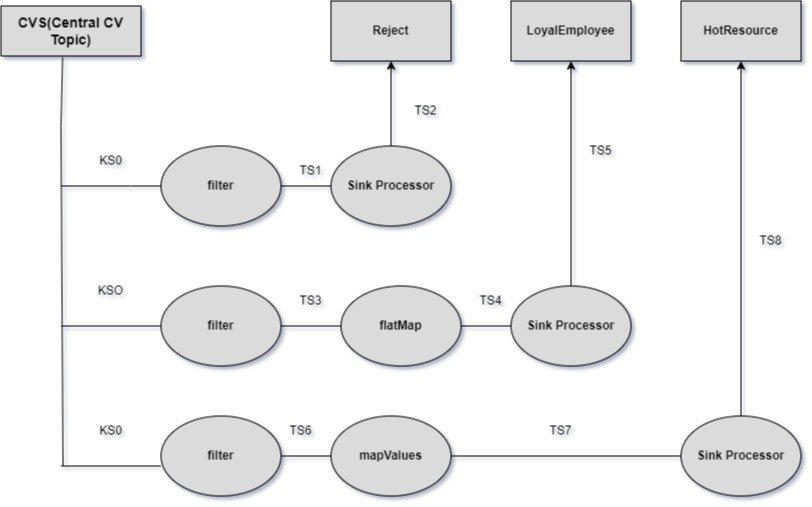
Understanding Topologies
A Kafka Streams application is essentially a Topology — a Directed Acyclic Graph (DAG) of processors.
- Source Processor → Reads from a Kafka topic (creates a KStream).
- Processor Nodes → Apply transformations like filtering, mapping, aggregations.
- Sink Processor → Writes results to another Kafka topic.
This DAG-driven design makes your stream processing logic clear, testable, and scalable.
Kafka Streams Basics: Four-Step Recipe
Building a Kafka Streams app is usually a four-step process:
- Define Configurations
- Application ID (unique for your app)
- Bootstrap servers
- SerDes (Serializer/Deserializer) for keys & values
- Build a Topology
- Define your computation graph using
StreamsBuilder - Add transformations (
filter,map,flatMap,foreach,to)
- Define your computation graph using
- Start the Stream
- Instantiate a
KafkaStreamsobject and callstart()
- Instantiate a
- Graceful Shutdown
- Always add a shutdown hook for cleanup
Scaling Kafka Streams: Threads & Tasks
A task in Kafka Streams represents a portion of the topology tied to specific input partitions .For each input topic partition, Kafka Streams creates a corresponding stream task. It can be safely be termed as a Unit of Parallelism.
If you have:
orderstopic with 4 partitions, and- 1 application instance
Then Kafka Streams creates 4 tasks (task-0 to task-3), one for each partition.
Each task maintains its own:
- State store(s)
- Processing logic
- Offset tracking
- Internal cache
Tasks are logical — they can be reassigned or migrated between threads or instances when scaling. Kafka Streams divides the processing topology into a fixed number of stream tasks, equal to the total number of input partitions. Each task handles data from a specific subset of those partitions.
Kafka Streams scales in two ways:
- Vertical Scaling (Threads)
- Configure
num.stream.threads→ Runs multiple threads in a single instance. - Each thread executes one or more Stream Tasks (logical units of work).
- Best when, you have spare CPU capacity in the same machine, or moderate throughput.
- Configure
- Horizontal Scaling (Instances)
- Run multiple instances of your Streams app on different machines.
- Kafka automatically rebalances tasks across instances.
- Best when , you need large-scale throughput or want high availability.
The maximum parallelism is bounded by the number of partitions in your input topics.
Bringing It Together: Tasks + Threads + Partitions
Example Scenario:
| Setup | Description |
|---|---|
| Topic | 6 partitions |
| Tasks | 6 (1 per partition) |
| Application Instance | 1 |
| Threads | 3 |
➡️ Distribution:
Thread-1→ Tasks 0, 1Thread-2→ Tasks 2, 3Thread-3→ Tasks 4, 5
If you increase threads to 6 → 1 task per thread.
If you increase app instances to 2 → tasks are rebalanced:
- Instance A → 3 tasks
- Instance B → 3 tasks
Fault Tolerance in Kafka Streams
If one instance crashes, its tasks are reassigned to surviving instances.
Offsets & state stores ensure no duplicate or lost processing.
So instead of manually juggling offset commits and transactions, Streams API abstracts away the complexity.
Streams DSL vs. Processor API
- Streams DSL → High-level, easy, covers 90% of use cases. Example:
filter(),map(),flatMapValues(),to(). - Processor API → Low-level, gives fine-grained control when you need custom processing logic.
Best practice: Start with Streams DSL and only drop to Processor API for special cases.
Real-Life Use Case
Imagine a retailer with multiple stores. They want:
- A shipment service → Listen to home-delivery invoices
- A loyalty service → Reward PRIME customers
- A trend analytics pipeline → Mask data, flatten invoices, push to Hadoop
With Kafka Streams Topology, this can be modeled in under 100 lines of code. Without Streams API? You’d be writing thousands of lines of consumer logic, offset handling, and fault recovery.
Key Takeaways & Best Practices
- Match partitions to desired parallelism.
- If you want to process 8 streams in parallel → your input topic must have at least 8 partitions.
- Use multiple instances before maxing threads.
- Horizontal scale gives better fault tolerance.
- Keep
num.stream.threads≤ number of CPU cores. - Enable standby replicas for faster recovery:
num.standby.replicas=1 - Monitor rebalance events.
- Frequent rebalances can degrade performance.
- Avoid shared mutable state across tasks.
- Each task should be isolated for deterministic recovery.
- Kafka Consumers are fine for simple pipelines.
- Scalability & fault tolerance are handled by consumer groups and committed offsets.
- For real-time stream processing at scale, always prefer Kafka Streams API.
- Streams API gives you parallelism, state management, and fault tolerance without boilerplate.
- Topologies (DAGs) are the heart of Kafka Streams applications.
Final Thoughts
If Producers are the storytellers, and Topics are the bookshelves, then Kafka Streams is the librarian who keeps everything organized in real-time.
As a system designer, my advice is simple:
- Use Consumers for quick prototypes.
- Move to Kafka Streams when your system needs to grow, scale, and survive failures.
That’s where Kafka really shines as the backbone of real-time, data-driven architectures.