
A notification system is responsible for sending timely alerts to users through different channels .A notification system has become one of the most essential features in modern applications, enabling instant communication between platforms and their users. Whether it is a bank sending a payment confirmation, an e-commerce app updating on delivery status, or a news portal sharing breaking updates, notifications ensure timely information reaches the right users across multiple channels like email, SMS, push, or in-app alerts. Beyond just information delivery, they play a key role in user engagement, personalization, and retention. With the growing demand for real-time updates and seamless digital experiences, notifications are no longer just a supporting feature but a core component of product ecosystems. It has become an indispensable part of our daily life.
- It keeps us informed instantly (news alerts, weather warnings).
- It ensures we don’t miss critical updates (bank OTPs, payment confirmations, delivery status).
- It improves engagement (reminders, promotions, personalized offers).
- It provides convenience (calendar reminders, app updates, event invites).
Why Do We Need a Notification System?
Because:
- Scalability: If your app sends millions of notifications, direct integration with third-party services will create bottlenecks.
- Reliability: External APIs (email/SMS providers) fail. You need retries, fallbacks, and monitoring.
- Consistency: Different teams want to notify users in different ways. Without a unified system, the experience becomes inconsistent.
- Flexibility: Businesses evolve. Maybe today you support email and SMS, but tomorrow you need WhatsApp or in-app banners. A well-architected system should plug in new channels easily.
A notification system abstracts all of this complexity away.
Key Requirements
When designing, we must clarify the functional and non-functional requirements.
Functional
- Support multiple channels: Email, SMS, Push, In-App, WhatsApp, Slack.
- Template management for consistent branding.
- User preference management (opt-in/opt-out, preferred channel).
- Scheduling (immediate vs delayed delivery).
- Multi-language support.
Non-Functional
- Scalable: Handle millions of notifications per day.
- Reliable: Ensure delivery with retries and failover.
- Extensible: Easy to add new channels in future
- Low Latency: Near real-time delivery for critical alerts.
- Cost Efficient: Optimize channel usage (push is cheaper than SMS).
Architectural Overview
A scalable notification service follows a producer–consumer architecture, with decoupling between event generation and notification delivery.
Key Components of the service
- API Gateway / Notification API
Entry point for applications to request notifications. Provides validation, authentication, rate limiting. - Message Queue (MQ/Kafka/Pub-Sub)
Decouples producers (apps) from consumers (workers). Ensures buffering, ordering, and durability. - Notification Orchestrator / Worker Layer
- Reads messages from the queue.
- Applies business rules (preferences, throttling, personalization).
- Routes to appropriate channel adapters.
- Channel Adapters
- Encapsulate channel-specific logic.
- Integrate with third-party providers (Twilio, SendGrid, Firebase Cloud Messaging).
- FCM commonly used to send push notifications to android devices.
- SendGrid among the most popular email services, which offer a better delivery rate and data analytics
- Twilio SMS service
- Database
- Stores user preferences, templates, delivery logs.
- Can be split into relational (PostgreSQL) + NoSQL (Cassandra/DynamoDB) based on requirements.
- Monitoring & Analytics
- Tracks delivery rates, failures, latencies.
- Exposes metrics for dashboards (Grafana, Kibana).
- Admin Console / Dashboard
- Allows operations teams to configure templates, monitor campaigns, and handle exceptions.
Detailed Design
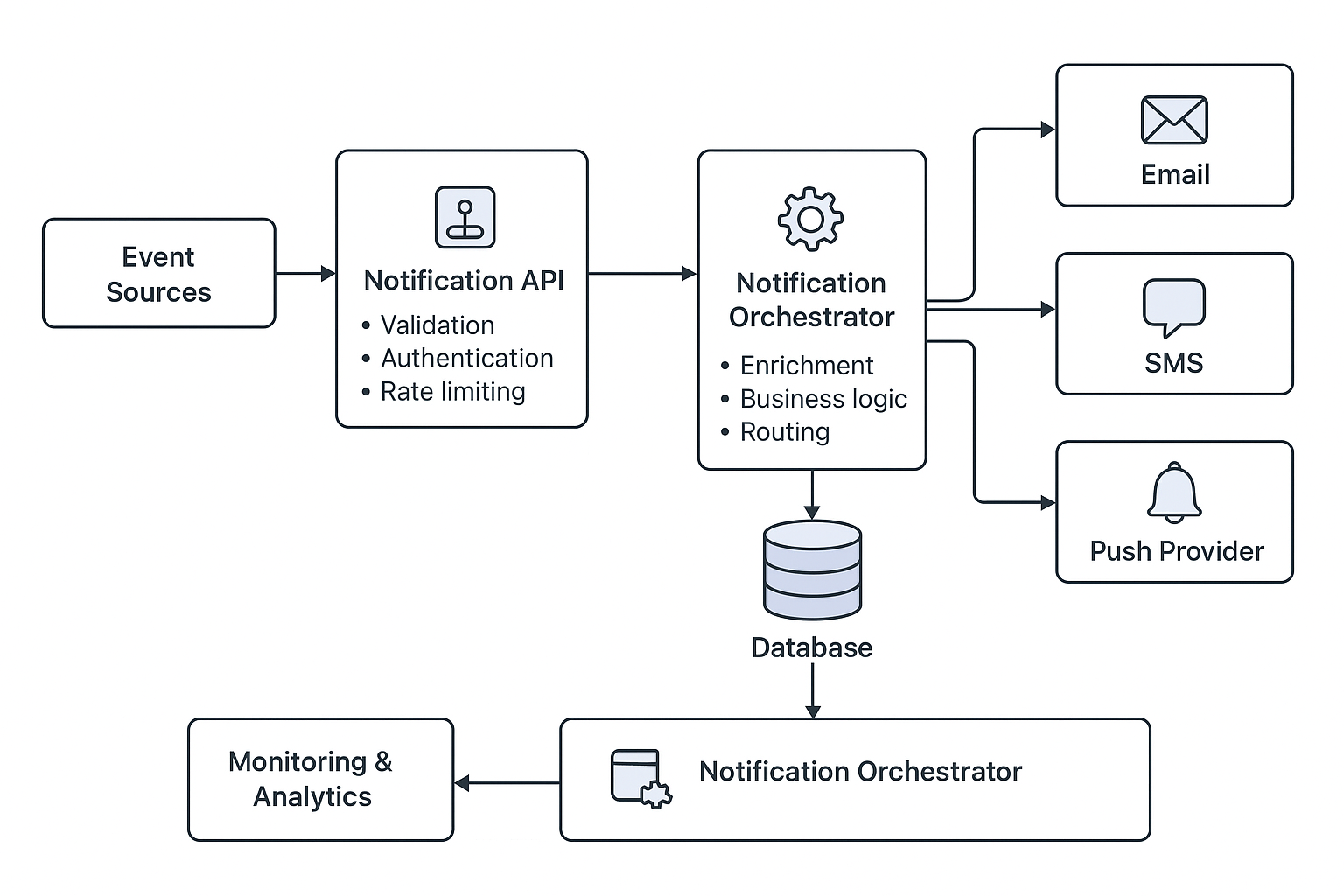
1. Notification API
- RESTful/GraphQL endpoints.
- Example:
{ "userId": "12345", "channel": ["sms", "push"], "templateId": "ORDER_CONFIRMED", "data": { "orderId": "56789", "amount": "1499" } }- Validation includes:
- User opt-in check.
- Rate limiting (per user, per channel).
- Template existence check.
2. Message Queue
Handles traffic spikes without overloading channel providers. Decouples system components. Guarantees message ordering (where required, e.g., banking alerts). Supports retries, dead-letter queues (DLQ) for failed messages
- Kafka for high-throughput streaming.
- RabbitMQ/SQS for simpler workloads.
3. Worker Layer
- Stateless microservices pulling from queues.
- Responsible for:
- Message enrichment (personalization).
- Applying business rules:
- User prefers SMS in the daytime, push at night.
- Promotional messages should not exceed 3 per week.
- Failure handling (retry with exponential backoff).
4. Channel Adapters
Each channel has its own adapter service.
Example:
- Email Adapter integrates with SendGrid, SES, Postmark.
- SMS Adapter integrates with Twilio, Nexmo, local telecom providers.
- Push Adapter integrates with Firebase Cloud Messaging (FCM) and APNs.
These adapters must:
- Support multiple providers (for failover, cost optimization).
- Provide a uniform interface to workers.
5. Database Design
- Relational DB (PostgreSQL/MySQL):
- Templates, campaign configurations, audit logs.
- NoSQL (Cassandra/DynamoDB):
- User preferences, notification history at scale.
Schema Example (simplified):
User_Preferences
| user_id | channel | opt_in | quiet_hours_start | quiet_hours_end |
Notification_Log
| notification_id | user_id | channel | status | timestamp |
6. Monitoring & Observability
- Metrics: Delivery success %, latency per channel, queue size.
- Logs: Failure reasons, retries, provider responses.
- Tools: Prometheus + Grafana, ELK stack.
Scalability Considerations
- Horizontal Scaling
- Workers can be scaled based on queue load.
- Adapters can run multiple instances behind a load balancer.
- Partitioning
- Kafka topics partitioned by user ID for parallelism.
- Rate Control
- Avoid overwhelming providers (e.g., sending 1M SMS at once).
- Implement throttling at worker level.
- Multi-Region Setup
- For global apps, notifications should be routed to nearest data center.
- Reduce latency for critical alerts.
Fault Tolerance & Reliability
- Retries
- Exponential backoff strategy.
- Retry only for transient errors (e.g., provider timeout).
- Fallback Providers
- If Twilio fails, retry via Nexmo.
- Email failover: SES → SendGrid.
- Dead Letter Queue (DLQ)
- Unrecoverable failures stored in DLQ.
- Ops team reviews and reprocesses.
- Idempotency
- Notification ID used to avoid duplicate deliveries.
Security & Compliance
- Encryption
- PII encrypted at rest and in transit.
- Authentication
- Notification API requires OAuth2/JWT tokens.
- Compliance
- GDPR/CCPA: Allow users to delete notification history.
- DND/Opt-out lists for SMS.
Advanced Features
- Notification Templates
- Stored as JSON/HTML.
- Support dynamic placeholders:
{{username}}, {{orderId}}.
- Personalization
- Based on user attributes (location, behavior).
- Example: Different message for premium vs free users.
- Campaign Management
- Batch notifications for marketing campaigns.
- Segmentation: Send only to users in Pune > Age 25.
- A/B Testing
- Test different subject lines or push titles.
- User Preference Center
- Self-service portal for users to manage preferences.
Example Flow: OTP via SMS
- User logs in → App calls Notification API with OTP request.
- API validates request → pushes message to Kafka.
- Worker consumes → applies template “Your OTP is {{code}}”.
- Routes to SMS adapter → sends via Twilio.
- Delivery response logged.
- Monitoring system tracks latency (should be <2s).
Technology Choices
- Queue: Kafka (high throughput), SQS (managed option).
- DB: PostgreSQL + Cassandra.
- Workers: Java/Spring Boot microservices.
- Adapters: Separate microservices for each channel.
- Infrastructure: Kubernetes for scaling.
- Monitoring: Prometheus, Grafana, ELK.
Challenges and Trade-offs
- Email Delivery at Scale
- High chance of being flagged as spam → need DKIM, SPF, DMARC setup.
- Push Notification Reliability
- Device tokens may expire → need token refresh strategy.
- Cost Optimization
- SMS is expensive → prefer push/email for non-critical messages.
- Multi-channel Orchestration
- If push fails, fallback to SMS. But this increases complexity.
Future Enhancements
- AI-driven personalization (send at the “right time” based on user behavior).
- Real-time analytics dashboard for campaigns.
- Support for emerging channels (WhatsApp Business API, RCS).
- Event-driven architecture with serverless functions for lightweight cases.
Wrapping Up
Designing a Notification Service is a classic case of balancing scale, reliability, and flexibility. At small scale, you could simply integrate directly with Twilio/SendGrid. But at enterprise scale, with millions of daily events, you need a dedicated, scalable, multi-channel notification system with queueing, orchestration, monitoring, and fault tolerance.
As system designers, our responsibility is not just to deliver messages, but to ensure the right message reaches the right user at the right time, through the right channel — reliably and at scale.